The global events industry is worth over $466 billion in the United States alone — and 78% of organizers identify in-person conferences as their single most impactful marketing channel. Yet for years, one problem threatened every event's first impression: the check-in queue. Today, QR codes for events have eliminated that problem entirely. A single scan takes 2–3 seconds, reducing entry times by up to 75% compared to manual processes. But QR codes at events go far beyond fast check-in — they power registration, secure ticketing, VIP access control, attendee networking, lead capture, and post-event engagement. This guide covers every use case, best practice, and setup step so you can run smoother, smarter events in 2026.

Events of all sizes — from 50-person corporate workshops to 50,000-person music festivals — have converged on QR codes as the default event management tool. The reasons are both practical and strategic.
On the practical side, QR codes require no specialist hardware. Every modern smartphone camera can scan them natively. No app download, no registration friction — attendees simply open their camera and point it at the code. On the strategic side, QR codes generate data. Every scan produces a timestamp, a location, and an attendee identifier, feeding real-time dashboards that help organizers manage capacity, staffing, and emergency response on the fly.
According to qr-insights.com's 2025 State of QR Codes report, the events industry now accounts for 7.88% of all global QR code scans — making it one of the top five verticals for QR adoption. Meanwhile, 80% of event attendees now prefer digital tickets over paper, and 58% of all event ticket transactions happen on mobile devices. The infrastructure has shifted: attendees expect digital-first experiences, and QR codes are the connective tissue that makes those experiences work.
For a broader picture of how QR codes are transforming marketing and operations, see our QR Code Marketing: The Complete Strategy Guide and our overview of QR codes for event management.
The attendee journey begins long before the event date — and QR codes are increasingly the bridge between the first touchpoint and a confirmed registration. A URL QR code embedded in a poster, flyer, email, or social media post allows anyone to scan directly to your event registration page, eliminating the step of typing a web address.
This scan-to-register workflow has measurable impact. Research shows that QR-enabled registration links achieve significantly higher conversion rates than URL-only CTAs, because the friction of typing a long link or searching for an event is removed entirely. Place the registration QR code on:
Using dynamic QR codes for registration links is especially powerful. If your registration platform URL changes, or you need to redirect to a waitlist page, you update the destination URL without reprinting a single poster. This flexibility is essential for event series, recurring conferences, or last-minute venue changes.
Dynamic QR codes also enable pre-event analytics: you can track which channels — poster, email, social, or print — are driving the most registrations, and allocate promotion budget accordingly.
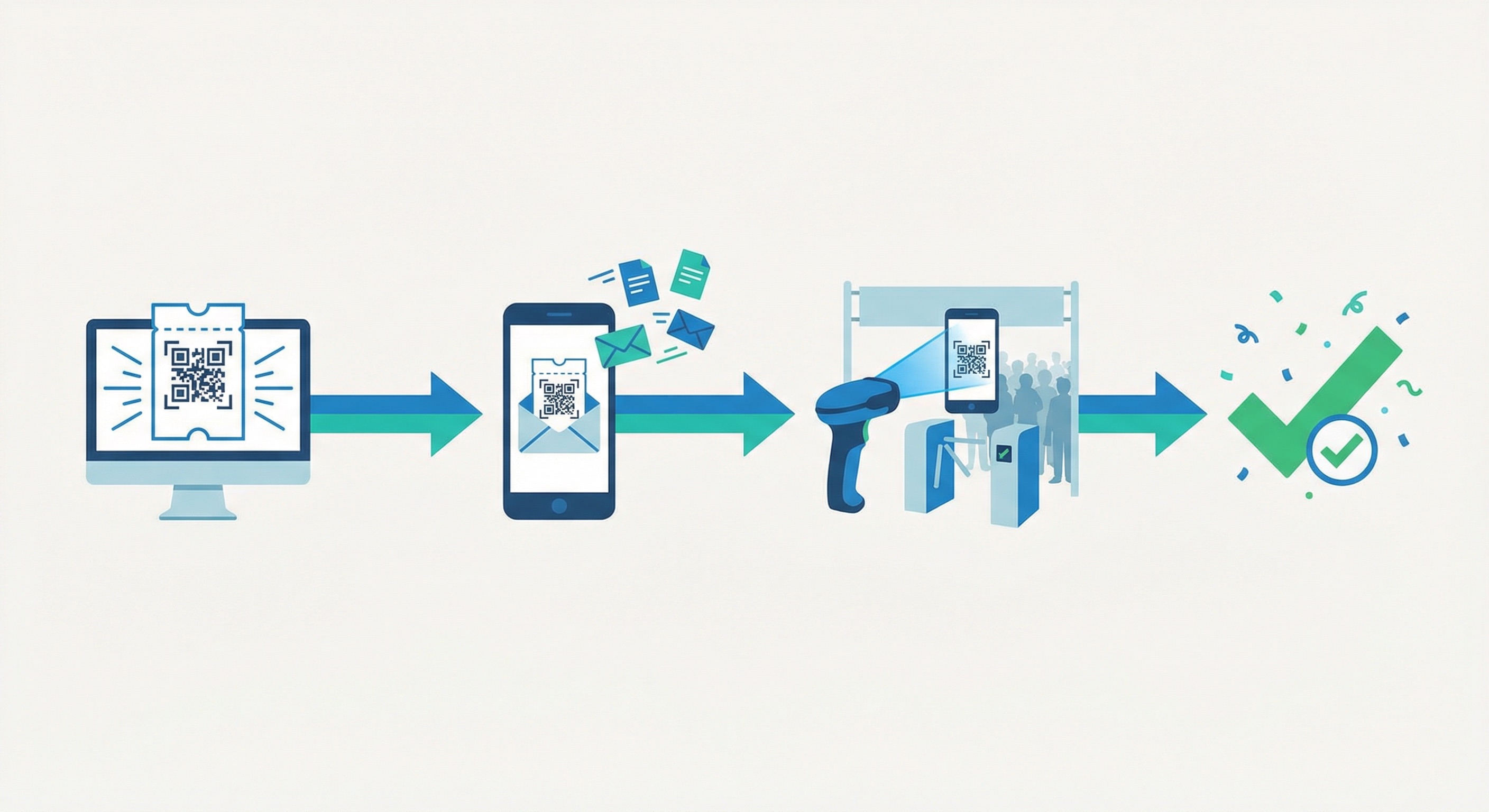
QR code ticketing has replaced paper tickets as the global standard — and for good reason. Each ticket receives a unique, encrypted QR code that encodes the attendee's identity, ticket type, and access level. When scanned at entry, the system validates the code against a central database in under a second, then locks it to prevent reuse. The result: fraud rates below 0.1% even at the largest events.
The lifecycle of a QR code ticket is elegantly simple:
For multi-session or multi-day events, QR code tickets can encode different access levels — general admission, VIP, speaker, press, or sponsor — with each tier triggering different validation outcomes at different checkpoints. This replaces wristbands, physical passes, and paper accreditation systems with a single digital credential on the attendee's phone.
For events with hundreds or thousands of tickets, bulk QR code generation allows you to create and assign individual unique codes across your entire attendee list from a single CSV upload — no manual work required. Learn more about this approach in our guide to bulk QR code generation.
Attendees benefit too: 76% of event attendees report that ticket security significantly influences their decision to attend — and the visible tech-forwardness of QR ticketing reinforces confidence in the event's professionalism.

The check-in experience sets the emotional tone for an entire event. A 20-minute queue before a morning keynote creates frustration that lingers for hours. A smooth, 3-second scan-and-go check-in energises attendees from the moment they arrive.
QR code check-in systems deliver that smooth experience by eliminating every bottleneck of traditional check-in:
The performance numbers are striking: average entry time drops from 3–5 minutes per person to under 30 seconds — a reduction of up to 75%. Systems configured with multiple scanning lanes can process hundreds of attendees per minute during peak arrival periods.
Real-time attendance dashboards give organisers live visibility into how many people have checked in, how fast entries are flowing, and which zones are at capacity — critical data for staffing decisions and emergency protocols. For a deeper look at the analytics available, see our QR Code Tracking & Analytics: The Complete 2026 Guide.
Best practices for check-in day setup include:
Modern events are rarely one-zone, one-tier affairs. Conferences have breakout rooms, backstage areas, speaker lounges, and sponsor suites. Festivals have VIP sections, artist areas, and media zones. QR codes make multi-tier access control manageable at scale — without wristbands, physical keys, or manual sign-off.
By encoding access tier into the QR code itself, a single credential on an attendee's phone can govern:
Dynamic QR codes add a further layer of control: access permissions can be updated in real time without reissuing credentials. A keynote speaker added to the lineup the night before the event can receive a valid credential instantly. An attendee whose access has been revoked can have their code deactivated remotely.
For multi-venue events or tours, the same QR code infrastructure scales across locations — making it a natural fit for the trade show and exhibition circuit, hospitality and hotel events, and tourism and city-tour experiences that span multiple stops.

Networking is the primary reason most professionals attend events — yet traditional business card exchange is inefficient, environmentally wasteful, and often ends with a pile of cards that never get followed up. QR codes solve this elegantly.
By placing a vCard QR code on an attendee badge or lanyard, every participant carries a digital contact card that anyone can scan to instantly save their name, company, role, email, phone, and LinkedIn to their phone's contacts. No typing, no card loss, no "I'll add you on LinkedIn later" that never happens. Research cited by qrcodechimp notes that over 60% of networking connections are initiated before the event starts — and QR codes on pre-event confirmation emails allow that early engagement to begin even before arrival.
For exhibitors and sponsors, QR codes on stands and materials serve as a powerful lead generation tool. A URL QR code linking to a gated resource — a whitepaper, a product demo, a discount code — captures attendee details in exchange for value. Exhibitors at trade shows can replace expensive lead-scanning hardware with a simple QR code on their stand, linked to a form that feeds directly into their CRM.
Use these approaches to maximise networking and lead capture:
For a comprehensive framework on converting event attendees into leads, see our QR Codes for Lead Generation: The Complete 2026 Guide.
The event experience doesn't end when the venue empties — and QR codes extend your relationship with attendees well beyond the closing keynote. Post-event QR code campaigns can drive survey completion, content downloads, community sign-ups, and repeat attendance with minimal additional effort.
Feedback and NPS surveys are the highest-value post-event use case. A feedback QR code displayed on exit signage, printed on name badges, or embedded in the closing remarks slide gives attendees an immediate, frictionless way to share their experience while it's still fresh. QR-enabled surveys achieve response rates of 40–60% — compared to just 15–25% for emailed follow-up links — because the barrier to action is so low. For an in-depth strategy, see our QR Code Customer Feedback: 7 Proven Strategies.
Beyond feedback, post-event QR codes can deliver:
Because dynamic QR codes remain live indefinitely after the event, you can also continue updating their destination — turning a "view session recordings" code into a "register for next year" code without any reprinting. This is particularly valuable for event venue and hospitality partners who want to maintain ongoing engagement with event attendees.
Trade shows and conferences represent the most sophisticated QR code deployment environments in the events space. The density of competing exhibitors, the complexity of multi-track session programmes, and the networking intensity all create specific challenges that QR codes are uniquely positioned to solve. For dedicated guidance, see our QR codes for trade shows page.
For exhibitors, the core challenge is lead capture at scale. Traditional badge-scanning systems cost exhibitors hundreds of dollars per event in hardware rental. A well-designed QR code system — a single printed code on the stand, linked to a contact capture form — costs almost nothing and delivers the same result. Dynamic codes allow exhibitors to update their offer (a new whitepaper, a live demo booking link) throughout the show without reprinting materials.
For conference organisers, QR codes can manage the entire attendee journey:
For a detailed look at using QR codes to drive engagement and capture leads in high-traffic environments, see our guide to QR Code Marketing Ideas: 15 Creative Campaign Strategies and our overview of the 15 most practical QR code use cases.
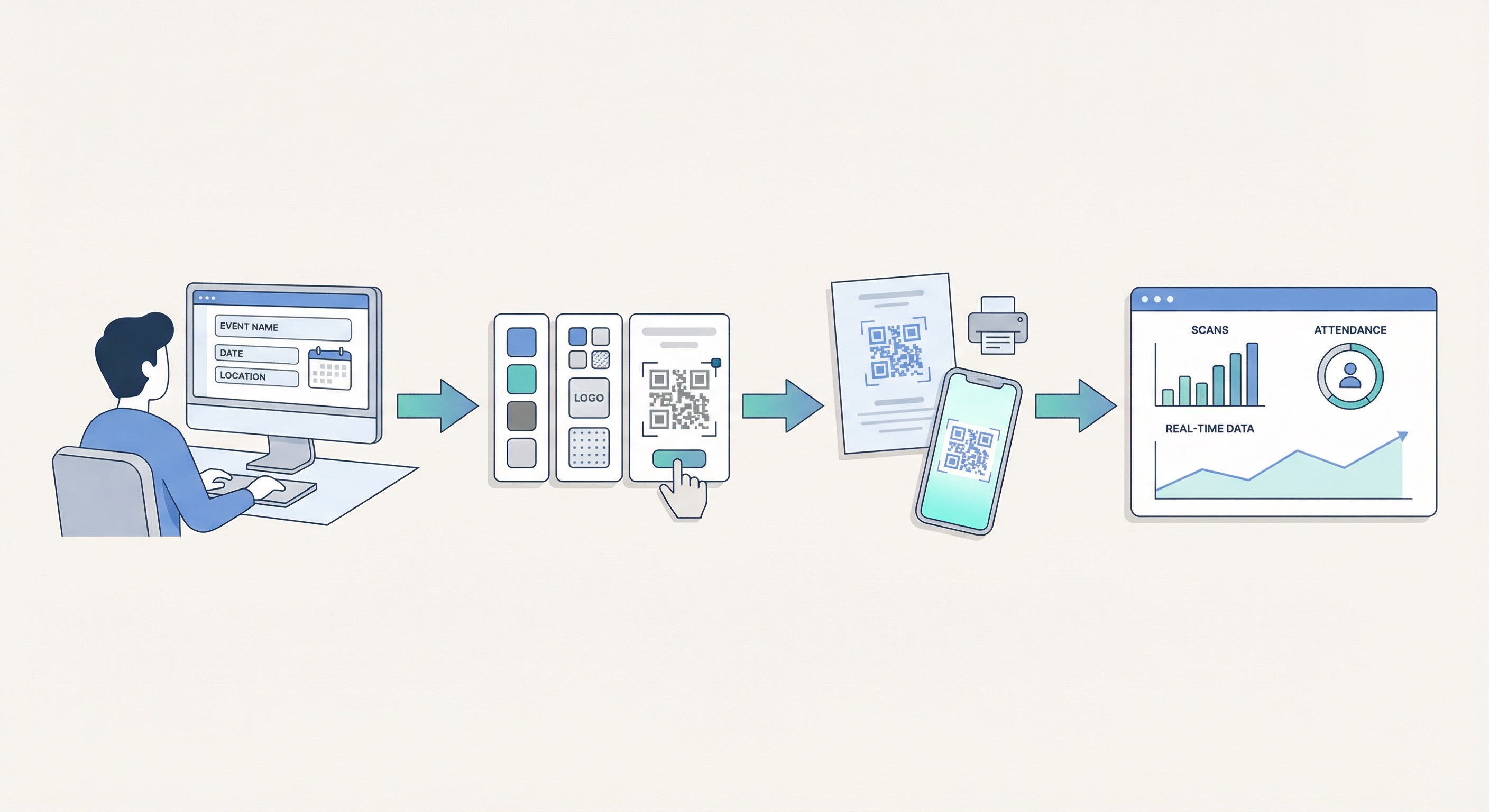
Creating professional QR codes for every stage of your event workflow takes minutes with Supercode. Here's how to build your complete event QR code system:
Match the QR code type to its purpose. For registration and ticketing links, use a URL QR code. For attendee badges, use a vCard QR code. For post-event surveys, use a feedback QR code. For session materials, use a PDF QR code. Always choose dynamic codes — they can be updated if your URL changes, and they provide full scan analytics.
Event QR codes are a branding opportunity. Use Supercode's design tools to match your event colour palette, add your event logo to the centre of the code, and choose a pattern style that complements your materials. A branded, visually appealing QR code gets scanned more often than a plain black-and-white square — research suggests custom QR codes achieve up to 30% higher scan rates. For full design guidance, see our QR Code Design: The Complete Guide.
For events with hundreds or thousands of attendees, upload your registration list as a CSV and generate individual unique QR codes for every ticket holder in one batch. Supercode's bulk QR code generator handles large volumes with no manual work, outputting each code ready for insertion into individual confirmation emails or printed badge sheets.
Download your QR codes at high resolution for print use, or copy the embed code for digital deployment. Place registration codes on event posters and printed brochures. Embed ticketing codes in confirmation emails. Print networking vCard codes on badges. Post feedback codes on exit displays and closing slides.
Supercode's analytics dashboard shows every scan in real time: timestamp, device type, and approximate location. During the event, monitor your check-in QR codes to track attendance flow. After the event, analyse which materials drove the most registration scans to improve your next promotion campaign. For a full guide to QR code analytics, see our QR Code Tracking & Analytics guide.
View Supercode's pricing plans — every plan includes dynamic QR codes with full analytics and all features — starting free, with no feature gating.
Event QR codes fail for predictable, preventable reasons. Follow these best practices to ensure your codes work flawlessly on event day.
For a comprehensive checklist of what goes wrong with QR codes and how to prevent it, see our 10 Mistakes to Avoid When Creating QR Codes.
A QR code for events is a scannable 2D barcode used at any stage of the event lifecycle — registration, ticketing, check-in, access control, networking, or post-event engagement. Attendees scan the code with their smartphone camera to trigger a specific action, such as opening a registration page, validating a ticket, or saving a contact. Learn what a QR code is and how it works.
Traditional check-in requires staff to search a name list and manually verify each attendee — a process that takes 3–5 minutes per person. QR code check-in eliminates both steps: the attendee's identity and ticket validity are encoded in their unique code, which the scanner validates in under 3 seconds. With multiple simultaneous scanning stations, events can process hundreds of entries per minute with no queues.
Yes. Each ticket's QR code is unique, encrypted, and linked to a central database. Once scanned, the code is immediately locked to prevent re-use. The system validates the code's authenticity in real time against the database, flagging duplicates, revoked tickets, and counterfeits instantly. Industry data shows fraud rates below 0.1% at events using QR code ticketing systems.
A static QR code encodes its destination permanently — it cannot be updated after printing. A dynamic QR code stores a short URL that redirects to the actual destination, which can be changed at any time without reprinting. For events, dynamic codes are essential: if your registration platform URL changes, your venue shifts, or you need to redirect a feedback code to a new survey, you update the destination in your dashboard and all existing printed codes automatically point to the right place. Read our full dynamic vs. static QR code guide.
A full event QR code system typically includes: one registration QR code (or one per marketing channel if you want source tracking), a unique ticket QR code per attendee, one or more check-in validation codes per entry point, access-tier codes for VIP and zone management, one networking/vCard code per attendee badge, feedback codes for post-session surveys, and material codes for exhibitor stands and sponsor placements. For large events, use bulk QR code generation to create unique per-attendee codes at scale.
Yes — when using a reputable QR code generator that supports HTTPS links and encrypted dynamic codes. Event attendees should be encouraged to check that scanned links begin with "https://" before entering any personal information. Organizers should avoid using plain URL shorteners or unverified QR code services. For a full guide to QR code security, see Are QR Codes Safe in 2026?
Absolutely. For virtual events, QR codes in promotional materials, email newsletters, and social media posts link directly to the event registration or livestream page — turning any printed or digital touchpoint into an entry portal. For hybrid events, QR codes bridge physical and digital attendance: in-room attendees scan to access session materials, while the same QR code can be shared digitally with virtual participants. Explore the 15 most practical QR code use cases for more hybrid event ideas.
Whether you're organising a 50-person workshop or a 5,000-person conference, QR codes give you a fast, secure, data-rich foundation for every stage of the attendee experience. From the first registration scan to the post-event feedback survey, every interaction becomes measurable, manageable, and smooth.
Supercode makes it easy to create, customise, and track dynamic QR codes for events of any size — with bulk generation for ticketing, real-time analytics for check-in, and design tools to match your event branding. Sign up free at app.supercode.com and build your complete event QR code system today.